
Why do mobile landing pages convert worse for paid traffic?

The mobile conversion gap is the difference between the landing page conversion rate for phone visitors and for desktop visitors who clicked the same ad. Below: what we found on Ruh AI's own paid landing page, a worked example to size your own gap, our view on where to look first and a mobile landing page checklist to copy.
What causes the mobile conversion gap?
Partly the page: a phone exposes faults that a desktop hides. A form one scroll down, a field that zooms the screen and a button too small for a thumb barely register on a desktop. On a phone, each one can lose you the visitor.
On Ruh AI's paid landing page for its construction takeoff estimator, most paid visitors arrived on a phone, and before our fixes, phone visitors converted about 6x worse than desktop visitors. Ruh AI is the first company Ciny runs for. These are one page's figures, recorded in July 2026, not a study.
Why do mobile landing pages matter more in late 2026?
Because Google is moving more Search campaigns to AI Max, and its final URL expansion setting lets Google, not you, choose the landing page. It is on by default when you opt in to AI Max, in Performance Max and, from February 2027, in upgraded Dynamic Search Ads campaigns. With it on, a blog post built for desktop readers can become a paid mobile landing page without anyone deciding it should.
Google's Ads and Commerce blog post on the upgrade, updated on 11 June 2026, says campaigns using automatically created assets and campaign-level broad match "will continue to be auto-upgraded starting in September 2026". It does not list final URL expansion among the features those upgrades switch on, so check the setting in each upgraded campaign. Google's help page on final URL expansion in Search sets the condition: "When both Text customization (formerly known as automatically created assets) and Final URL expansion settings are turned on, Google may replace your Final URL with a more relevant landing page based on the user's search query". In Performance Max, it "can serve and receive traffic on any page that hasn't been excluded."
| Campaign | When it moves to AI Max | Features Google lists as on | Can Google choose a different landing page? |
|---|---|---|---|
| Search with automatically created assets | Auto-upgraded from September 2026 | Search term matching and text customization | Only if you also turn on final URL expansion |
| Search with campaign-level broad match | Auto-upgraded from September 2026 | Search term matching | Only if you turn on text customization and final URL expansion |
| Dynamic Search Ads | Auto-upgraded from February 2027 | All three, including final URL expansion, with your legacy URL controls kept | Yes, within those URL controls |
| Search campaigns you opt in to AI Max | When you opt in | Text customization and final URL expansion | Yes, unless you turn final URL expansion off |
| Performance Max | Not part of the upgrade | Final URL expansion | Yes, on any page of your domain you have not excluded |
List every page Google can pick, then bring each one up to the checklist below or exclude it. In Performance Max, the "Expanded Final URL assets" tab in asset reporting lists each expanded final URL that served.
What did we find on our own paid landing page?
Small faults that were invisible in the code and obvious on a phone, and page speed that was already good. The figures come from Ruh AI's paid landing page playbook, recorded in July 2026 from the page's analytics and from measuring the live page in a browser.
| What we recorded | Figure | Checklist item that catches it |
|---|---|---|
| Phone conversion against desktop, before the fixes | About 6x worse | Starts, submissions and conversions counted |
| Rendered height of a button whose code looked adequate | 36px, against our 44px minimum | Tap targets measured |
| Form field text size before the fix | 14px, against the 16px we now use | Few fields, built for a phone |
| Language of the browser's error bubbles shown to US visitors | Spanish | Your own error messages |
| Gap between the consent banner and the submit button on a 390 × 844 phone screen, after the fix | 32px clear | Consent banner clear |
| Core Web Vitals: loading (LCP), response to a tap (INP) and layout shift (CLS) | 1,878 ms, 80 ms and 0.014 | Speed checked before it is changed |
The record gives the gap before the fixes, so the sections below show what we found and changed.
How much is the mobile gap costing you?
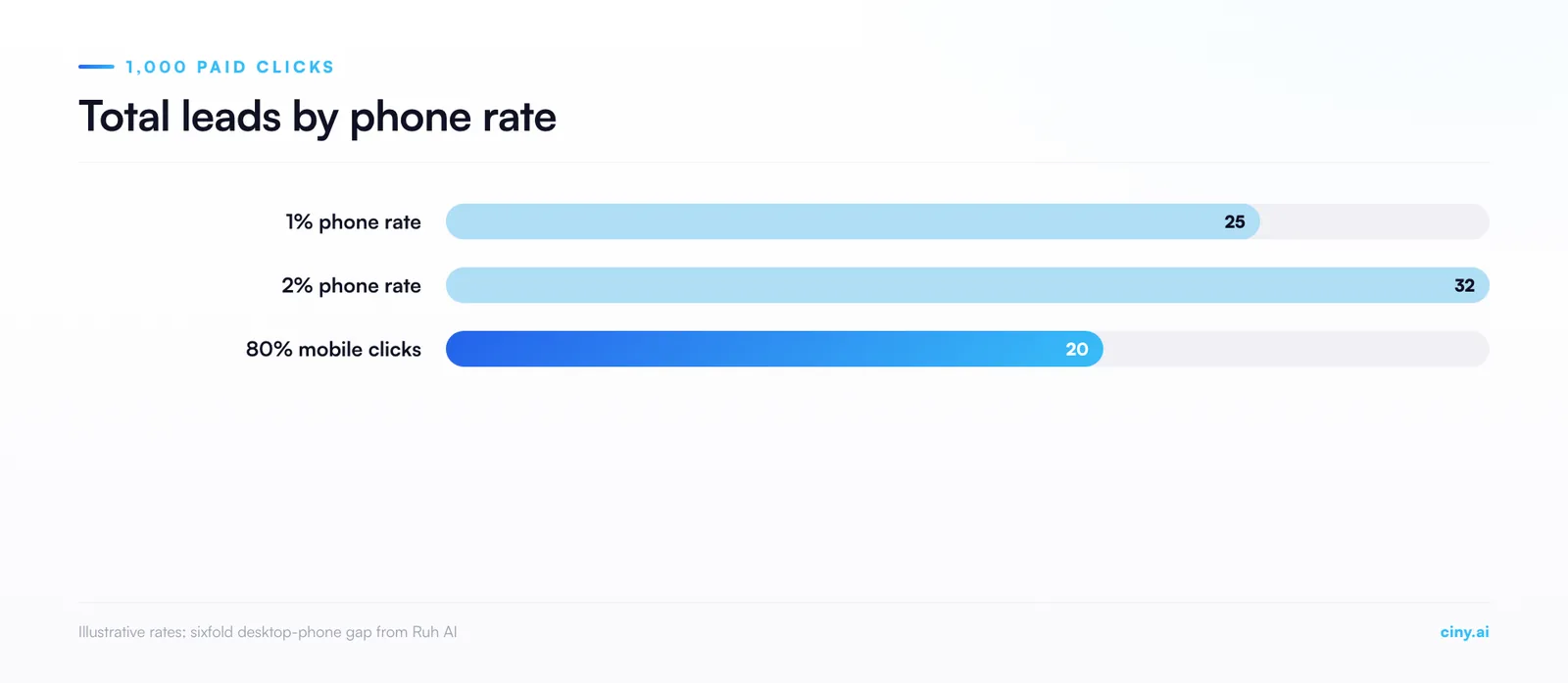
In the illustrative example below, phones take 70% of the clicks but bring 28% of the leads, and doubling the phone conversion rate cuts cost per lead by about 22%. Only the sixfold gap between desktop and phone comes from our page. The 70% and the rates are illustrative.
Assume 1,000 paid clicks, 70% on phones, a desktop rate of 6%, a phone rate of 1% and the same price per click on both.
- Leads: 700 × 1% = 7 phone leads and 300 × 6% = 18 desktop leads, 25 in total.
- Phone share of leads: 7 ÷ 25 = 0.28. Phones take 70% of the clicks and the spend but bring 28% of the leads.
- The upside: double the phone rate to 2%. Phone leads rise from 7 to 14 and total leads from 25 to 32. The spend is the same, so cost per lead falls to 25 ÷ 32 = 0.78 of what it was, about 22% lower.
- The exposure: if phones rise to 80% of clicks at the same rates, 800 × 1% = 8 and 200 × 6% = 12, 20 leads in total. That is 5 ÷ 25 = 0.2, so 20% fewer leads, and 25 ÷ 20 = 1.25, so each lead costs 25% more.
Your version: phone share of leads = m ÷ (m + R × (1 − m)), where m is the phone share of clicks and R is your desktop conversion rate divided by your phone conversion rate. In a spreadsheet, put m in B1 and R in B2 and use =B1/(B1+B2*(1-B1)). Check it with the example: 0.7 ÷ (0.7 + 6 × 0.3) = 0.7 ÷ 2.5 = 0.28.
Take m and R from one date range in your Google Ads campaign report, segmented by device, as the FAQ below explains. The result shows how exposed you are if clicks shift towards phones, not why your phone rate is lower.
What should a phone visitor see in the first screen?
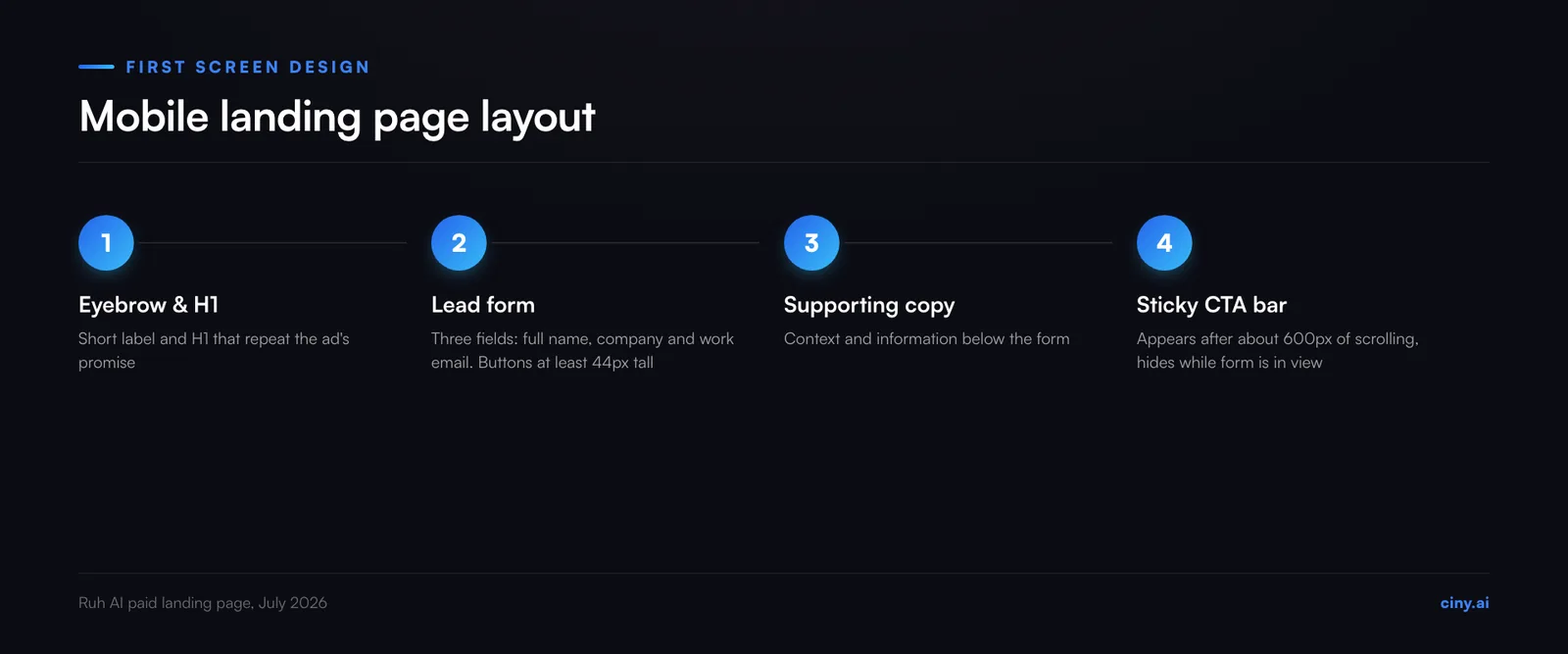
The offer and the form, with nothing pushing the form down. On our page the mobile order is a short label above the headline (an eyebrow) and an H1 that repeat the ad's promise, then the form, then the supporting copy.
- The form has three fields: full name, company and work email.
- Mid-page buttons scroll down to the nearest form, never back up to the hero, and the hero form has its own anchor so an ad can link straight to it.
- A sticky call-to-action bar appears after about 600px of scrolling and hides while its form is in view.
- The consent banner is one row of three buttons with nothing layered above it, so visitors can always see and answer it, and we trimmed the hero's top padding until the submit button cleared it by 32px.
Why do mobile lead forms leak, and what did we change?
They leak through small faults that desktop testing misses. We found three on ours.
- Zoom on tap. Our 14px fields made iOS Safari zoom in on tap, leaving visitors to zoom back out. We found no Apple documentation of the cut-off, but developer write-ups such as CSS-Tricks say that at 15px or less "the viewport will zoom into that input". We set the fields to 16px.
- Errors in the wrong language. The browser's built-in validation bubbles follow the device's language, and our record shows US visitors receiving them in Spanish. We replaced them with our own: one inline message, announced to screen readers, with focus moved to the field and never shown by colour alone.
- Buttons smaller than they looked. A button rendered 36px tall. Submit, navigation and consent buttons are now at least 44px tall, measured in the browser.
Two more rules came from the same review. The submit button dims and disables while sending, so a tap that seems to do nothing does not become a second tap and an exit. Reveal animations carry a reduced-motion style and a no-script fallback, so the form still shows for visitors who turn motion or scripts off.
Should you fix page speed first?
Only if your Core Web Vitals fail. These are three measures defined in Google's web.dev guidance: Largest Contentful Paint (LCP), how fast the largest image or text block appears, Interaction to Next Paint (INP), how fast the page responds to a tap, and Cumulative Layout Shift (CLS), how much the layout jumps. Good means LCP within 2.5 seconds, INP of 200 milliseconds or less and CLS of 0.1 or less, measured at "the 75th percentile of page loads, segmented across mobile and desktop devices." Search Console's Core Web Vitals report and PageSpeed Insights show your figures from real visits.
Ours recorded 1,878 ms, 80 ms and 0.014, under all three, though our record does not say whether these are 75th-percentile mobile figures. We left speed alone and worked on the first screen and the form, because changing a page that passes risks breaking what works.
What do teams get wrong about mobile landing pages?
Our view: Check that your conversion tracking records real leads, then look at the form. Bidding that learns from a conversion that does not fire on real leads is working blind, and no page fix will show in its numbers. Every page fault in our record sat in the first screen, the form or the buttons that lead to it, and none in page speed.
Measure the rendered page, not the code or the screenshot. A padding class that looked roomy produced a 36px button, and preview screenshots twice showed the consent banner covering the submit button when browser measurement showed it clear.
Count form starts as well as submissions. The start rate tells you whether visitors fail to reach the form or fail to finish it.
The mobile landing page checklist
Run these twelve checks on a real phone, on every page that can receive paid clicks. Copy the list into your launch brief, or download the checklist as a Markdown file. No email needed.
- Know your landing pages. List every URL your campaigns can send clicks to, including pages chosen by final URL expansion. Each one passes this list or is excluded.
- Message match. The H1 repeats the promise of the ad.
- Form in the first screen. Eyebrow and H1, then the form, then the supporting copy.
- Few fields, built for a phone. Only what the first conversation needs. Text at 16px or larger, the email keyboard on email fields, autofill on and capitals on names.
- Tap targets measured. Submit, navigation and consent buttons at least 44 by 44px on the rendered page, not read from the code. To check, inspect the button in your browser's developer tools at phone size and run
$0.getBoundingClientRect()in the console. - Your own error messages. Browser validation bubbles off. One inline message in your page's language, announced to screen readers, focus on the field, never colour alone.
- One tap, one submission. The submit button dims and disables while sending.
- Buttons point down. Mid-page buttons go to the nearest form below. A sticky bar appears after about 600px, hides while a form is in view and never covers content.
- Consent banner clear. On a 390 × 844 screen in your browser's developer tools, the submit button stays visible while the banner shows, the banner's buttons are tap-sized and nothing is layered above it.
- Form visible without the reveal script. Reveal animations have a reduced-motion style and a no-script fallback, and the form still shows if the script fails to load.
- Speed checked before it is changed. LCP within 2.5 seconds, INP 200 ms or less and CLS 0.1 or less at the 75th percentile on mobile. If all three pass, work on the form.
- Starts, submissions and conversions counted. Track form starts as well as submissions, check that the conversion your bidding learns from matches the leads sales receives, and test with invalid entries only, so no test lead reaches sales.
Frequently asked questions
What size should tap targets be on a mobile landing page?
At least 44 by 44 CSS pixels for the buttons that matter, the WCAG 2.2 Level AAA standard in success criterion 2.5.5. The Level AA minimum in 2.5.8 is 24 by 24 CSS pixels, with exceptions such as enough spacing around a smaller target.
Where do I find my conversion rate by device?
In Google Ads, select the segment icon above your campaigns table and choose Device. Google says this segment lets you "compare performance across devices: computers, mobile phones, tablets and TV screens." Compare clicks and conversion rate on the mobile phones and computers rows for one date range.
How many fields should a mobile lead form have?
Only what the first conversation needs. Ours has three: full name, company and work email. That suits a B2B offer where the next step is a conversation, and it is our choice for this offer, not a tested rule for every form.
Does AI Max change which landing page my ads use?
It can. With final URL expansion on, Google may send the click to another page on your site that it judges more relevant to the search. It is on by default when you opt in to AI Max for Search and in Performance Max, but Google does not list it among the features the September 2026 auto-upgrades switch on. URL exclusions keep chosen pages out.
How this article was made
Ciny's content system drafted this article with AI assistance for Kevin Pinto, Creative Lead at Ruh AI, from Ruh AI's own landing page records. Every Google and W3C statement was checked against the live pages on 6 October 2026. The landing page figures come from Ruh AI's paid landing page playbook, recorded in July 2026. The worked example's 70% and conversion rates are illustrative.
Sources
Google and W3C, all checked on 6 October 2026:
- Google Ads and Commerce Blog, "We're upgrading Dynamic Search Ads to AI Max", 15 April 2026, updated 11 June 2026: https://blog.google/products/ads-commerce/dsa-upgrade-to-ai-max-2026/
- Google Ads Help, About Final URL expansion in Search: https://support.google.com/google-ads/answer/16230205?hl=en
- Google Ads Help, About Final URL expansion in Performance Max: https://support.google.com/google-ads/answer/14337539?hl=en
- Google Ads Help, Use segments in your tables: https://support.google.com/google-ads/answer/2454072?hl=en
- web.dev, Web Vitals, last updated 31 October 2024: https://web.dev/articles/vitals
- W3C, Understanding Success Criterion 2.5.5: Target Size (Enhanced): https://www.w3.org/WAI/WCAG22/Understanding/target-size-enhanced.html
- W3C, Understanding Success Criterion 2.5.8: Target Size (Minimum): https://www.w3.org/WAI/WCAG22/Understanding/target-size-minimum.html
A developer source, checked on 6 October 2026:
- CSS-Tricks, Chris Coyier, "16px or Larger Text Prevents iOS Form Zoom", 4 May 2021, a developer write-up, not Apple documentation: https://css-tricks.com/16px-or-larger-text-prevents-ios-form-zoom/
Our own evidence, from one landing page, not a study:
- Ruh AI paid landing page playbook, recorded July 2026 from the page's analytics and from measuring the live page in a browser: the conversion gap, the button, font size, error language and consent banner findings, and the Core Web Vitals figures recorded for the page.
What should you do next?
Run the checklist on your highest-spend landing page, on a real phone, this week. Then check whether final URL expansion is on in your campaigns, and run the same checks on every page it can reach or exclude the pages that fail.
If you want a page audit and a mobile Lighthouse lab check run on those pages, see Website Optimiser or talk to Ciny.